
Internal user profile
Allow opening an internal profile in chat
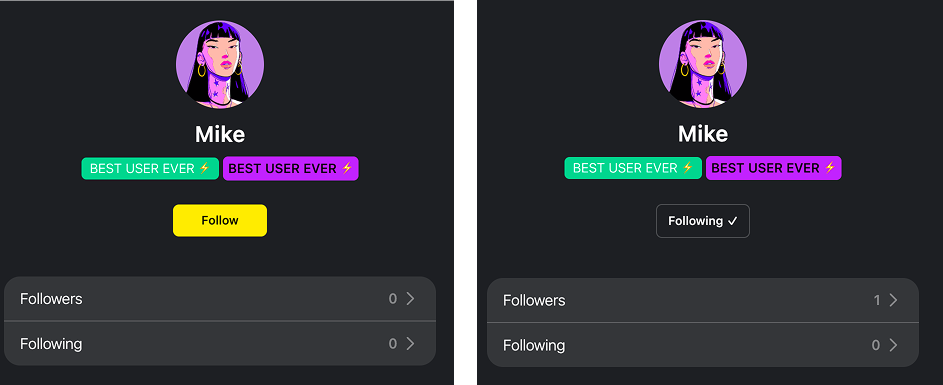
Users will be able to open each other's profiles inside the chat, from the dropdown menu on a message, or by tapping on an avatar or nickname. After opening it, users can follow each other and check lists of their own followers and users they are following. When a user opens another user's profile, they see their avatar, nickname, badges, VIP status, and, if the bet data integration is set up, their betting performance and the list of shared bets (see below).
The toggle lives in the admin panel under Settings, UI elements. Please note that you cannot activate both internal and external profiles at the same time.
Overview
The internal profile is a native profile inside the Watchers chat. Tapping a user's avatar or nickname opens their profile without leaving the chat. The profile turns active bettors into community influencers: players showcase their betting performance, while others follow them, copy their bets, or bet against them. For the operator this converts social activity directly into betting turnover.
The profile works in two tiers:
- Social tier, no integration required. Identity, badges, follow graph, and tips work out of the box as soon as the toggle is on.
- Betting tier, requires the bet data integration. Performance stats, open bets, and the bet feed appear once the operator connects a bet data service (see How the data gets in). Without it the profile simply hides these blocks.
What the profile shows
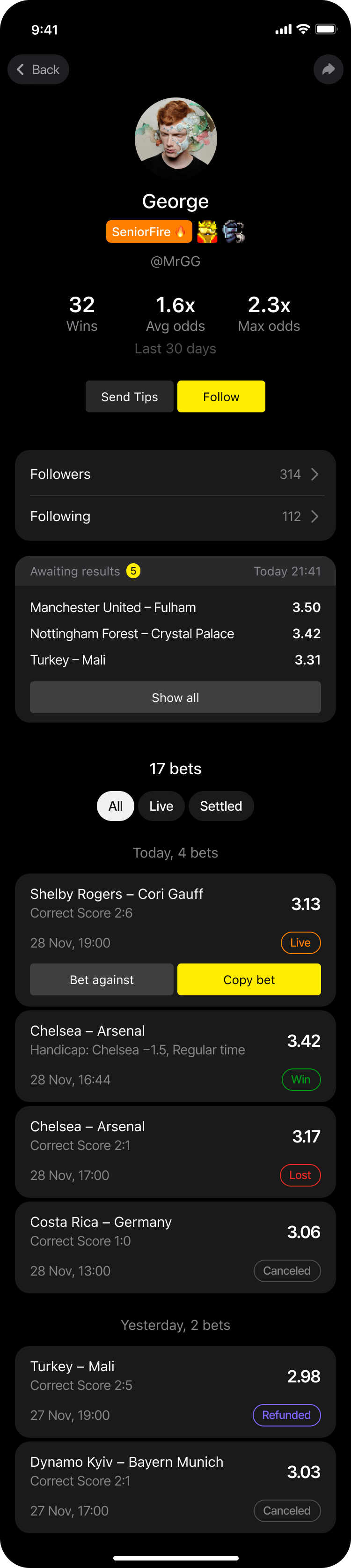
Header. Avatar, display name, VIP status, and the badges the player has earned in the chat.
Performance stats. Three headline metrics: Wins, average odds (Avg odds), and maximum odds (Max odds). The values come from the operator's bet data service. The interface labels them as covering the last 30 days, so the service is expected to calculate them over that window. The block is hidden when the service is not connected or returns no data for the player.
Actions. Follow and Send Tips. Following a player subscribes the viewer to their activity. Send Tips opens the standard tipping flow and is shown only when tipping is enabled for the project. A user's own profile also lists their tip transactions.
Social graph. Followers and Following counters. Tapping a counter opens the list with a search by name. Tapping a user in the list opens a short preview of their profile with the Follow and Send Tips actions.
Awaiting results. The player's open bets with their odds, collapsed to the three latest positions with a Show all control.
Bet feed. The full list of the player's visible bets, with a total counter and the filters All, Live, Settled. Bets are grouped by day and load as the viewer scrolls. Each bet card shows the event, the market and selection, the odds, the placement date and time, and the status, plus the chat engagement counters (repeats, copies, reactions). Bets that can still be played carry the standard copy betting actions, Copy bet and, when the bet allows it, Bet against, under the same rules as in the chat feed.
Bet statuses in the profile
The bet data service returns every bet with one of five statuses. The profile uses them for the filters and for the Awaiting results block:
| Status | Meaning | Where it appears |
|---|---|---|
IN_PLAY |
The bet is placed and not settled yet | Awaiting results, filter Live |
WIN |
The bet won | Filter Settled |
LOSE |
The bet lost | Filter Settled |
REFUND |
The stake was returned to the player | Filter Settled |
CANCELED |
The bet was voided, rejected, or canceled | Filter Settled |
The filter All shows every status. Mapping the sportsbook's own settlement statuses (including partial cashouts and half win or half lost outcomes) to these five values is done on the operator's side and is agreed during integration.
Privacy and consent
The profile shows only the bets the bet data service returns for the player. If the operator collects the player's consent to share bets with the community, the service must apply that consent before returning the feed: bets without consent must not be returned, and they must not be included in the stats. Watchers does not add a second filter on top.
How the data gets in
Watchers does not ingest a bet stream. Instead, the operator exposes a small HTTP service, the bet data service, and Watchers calls it on demand every time a profile is opened. The service is configured per project with its base URL and a bearer token; send both to your Watchers manager and we set them up.
Watchers calls the service with the player's external user id, the same id that is passed to the chat on authorisation, and the header Authorization: Bearer <token>.
Stats endpoint
GET {baseUrl}/v1/users/{externalUserId}/stats
Returns the three headline metrics. If there is no data for the player, return 200 with null values rather than 404, so the profile still opens.
{
  "userId": "player-123",
  "wins": 32,
  "avgOdds": 1.6,
  "maxOdds": 2.3
}
Bets endpoint
GET {baseUrl}/v1/users/{externalUserId}/bets?status=IN_PLAY,WIN&limit=20&cursor=
Returns the player's visible bets, newest first by orderDate.
| Query parameter | Description |
|---|---|
status |
Comma-separated list of statuses from the table above. Omitted means all statuses. |
limit |
Page size, default 20. |
cursor |
Opaque cursor from nextCursor of the previous response. |
{
  "data": [
    {
      "barcode": "A1B2C3",
      "status": "IN_PLAY",
      "betType": "SINGLE",
      "totalFactor": 1.85,
      "orderDate": "2026-09-30T18:04:00Z",
      "positions": [
        {
          "eventTitle": "Team A vs Team B",
          "eventDate": "2026-09-30T19:00:00Z",
          "factorValue": 1.85,
          "status": "IN_PLAY",
          "outcomeGroupTitle": "Match winner",
          "outcomeTitle": "Team A",
          "blockTitle": null
        }
      ]
    }
  ],
  "total": 34,
  "hasNext": true,
  "nextCursor": "eyJpZCI6MTIzfQ"
}
| Field | Description |
|---|---|
barcode |
Bet identifier, the same value as in the bet shared to the chat. |
status |
One of IN_PLAY, WIN, LOSE, REFUND, CANCELED. |
betType |
SINGLE or MULTI. |
totalFactor |
Total odds of the bet. |
orderDate |
Placement date and time, ISO 8601. |
positions[] |
Selections: event, event date, odds, status, market and selection titles, and the line value (blockTitle, for totals and handicaps, otherwise null). |
total |
Number of bets under the current filter, shown as the counter in the feed. |
hasNext, nextCursor |
Pagination. |
If the service is unavailable, the profile keeps working: the stats block is hidden and the bet feed shows an error state, while identity, follow, and tips remain available.