
Two-Factor Authentication (2MFA)
Purpose and Overview
Two-Factor Authentication (2MFA, also referred to as MFA — Multi-Factor Authentication) is a security mechanism that enhances account protection by requiring two independent authentication factors.
In this system, the second factor is a one-time TOTP code (Time-based One-Time Password), generated on the user’s side and valid for a limited period of time.
The goals of introducing 2MFA:
- protect accounts in case of password compromise;
- reduce the risk of unauthorised access;
- meet security and compliance requirements (ISO 27001, SOC 2, PCI DSS, etc.).
Authentication Factors
Within 2MFA, two factors from different categories are used:
- Something the user knows
- username and password;
- Something the user has
- a device or application capable of generating TOTP codes.
The TOTP code is not stored on the server in plain text and cannot be reused.
What Is TOTP
TOTP (Time-based One-Time Password) is an algorithm for generating one-time passwords based on the current time and a shared secret.
TOTP characteristics:
- based on the RFC 6238 standard;
- typically consists of 6 digits (sometimes 8);
- limited validity period (usually 30 seconds);
- each code can be used only once.
TOTP is widely supported by authenticator applications such as:
- Google Authenticator;
- Microsoft Authenticator;
- Authy;
- 1Password, Bitwarden, and others.
Enabling 2MFA
The user initiates 2MFA setup in the Functional settings.
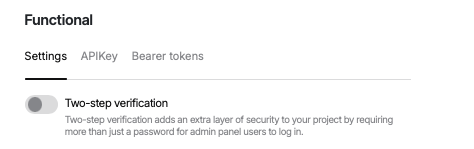
After enabling the function, the user has 14 days to activate 2MFA authorisation on his profile. When the term expires, the user will be denied access to the Back office functions.
The server generates a shared secret.
The user is shown:
- a QR code for scanning;
- a backup textual key.
The user adds the secret to an authenticator application.
The user enters the first TOTP code for verification.
2MFA is considered enabled.
Login with 2MFA
The user enters username and password.
After successful password verification, the system requests a TOTP code.
The user enters the current code from the authenticator app.
Upon successful verification, access is granted.
Backup Codes
To prevent loss of access, the system may provide backup one-time codes:
- generated during 2MFA activation;
- can be used instead of TOTP if the device is lost;
- each code is valid only once;
recommended to be stored offline.